How to Use a Check Mark Clearly in Forms and Interfaces
Learn how a check mark signals selection, completion, or approval, and label it clearly so readers know what action a form or interface records.
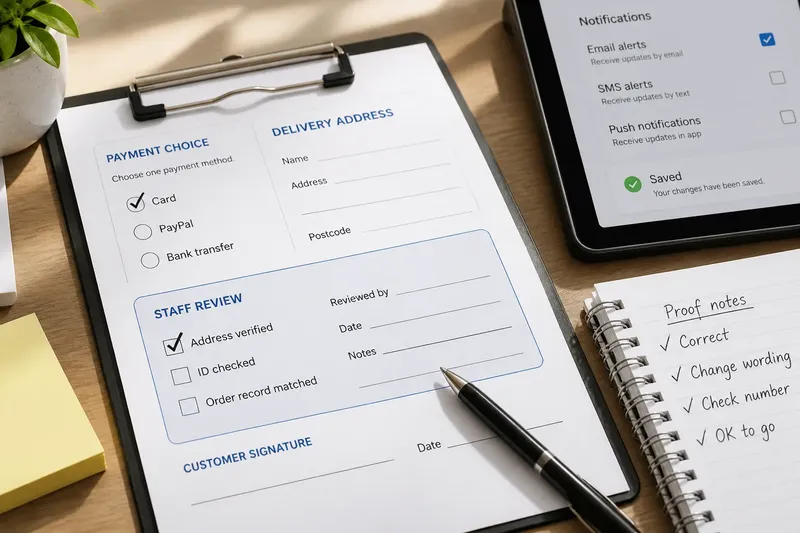
The most common mistake with a check mark is treating it as a universal sign for “done.” On a paper proof, it can flag a passage for attention; beside a name, it can signal approval; in an interface, it may show a selected setting or a saved change. The context determines what readers understand and what they do next.
Use context to define a check mark
A check mark has no fixed sentence attached. Its meaning comes from the object it touches, the task underway, and the convention shared by its users. The same angled strokes can record a choice, confirm a review, or indicate that a requirement has been met.
That flexibility makes the mark useful in handwritten records, forms, schoolwork, packaging, and screens. Rather than relying on a single historical origin story, treat its meaning as a convention that depends on the setting. A mark beside “paid” may record a transaction; beside “I agree,” it may show a selected choice; beside a sentence in a proof, it may signal that the passage needs attention.
The shape alone does not tell readers whether someone made a choice, completed a task, or approved an item. Nearby words and placement do that work. If those cues are missing, a reader may have to guess.
Match the mark to the action it records
Before adding a check mark, identify the specific action it represents. In a form or interface, the distinction between a choice, a completed requirement, a review, and a saved state matters.
- A choice has been made. If the mark sits beside one option in a list, label the group and keep the alternatives visible; if readers could mistake it for task completion, add “Selected” or use a clearly labeled checkbox.
- A requirement has been met. If the checklist item describes an observable condition, such as “signature present,” use a check to record that condition; if it says only “looks good,” rewrite it so the reviewer knows what to inspect.
- A reviewer has approved something. If a check means acceptance, name the review status; if it could instead mean “inspect this,” use a specific note such as “Review” or an annotation that identifies the requested action.
- A system has registered an action. If a check appears after saving, pair it with “Saved” when the state might be confused with a selected setting; if the mark only indicates selection, label the control rather than implying that a separate save occurred.
- A printed form records a response. If a mark belongs to one answer, keep it inside or beside that answer’s field; if the same page also uses checks for staff review, distinguish the staff area with a label such as “For office use.”
- A proofreader marks text. If the mark means a passage is accepted, place it where that reading is clear; if it requests a correction, add a short instruction so the author does not mistake it for approval.
Say you are preparing a printed order form with delivery-address and payment fields. The customer checks “Card” to select a payment method, then a staff member checks “Address verified” after comparing the address with the order record. If both marks appear in the same undifferentiated column, a later reader may confuse the customer’s choice with the staff review. Separate the fields under “Payment choice” and “Staff review,” and each mark has a clearer job.
Custom colors or decorative treatments are not worth the effort when labels and placement already make the meaning clear. Extra styling can add visual noise without resolving ambiguity.
Separate a check mark from a seal
A check mark and a seal can both be associated with confirmation, but they communicate through different visual actions. A seal is an impression attached to a document or object; a check is a drawn mark placed beside an item, choice, or passage. The seal’s form can point to an issuing authority, while a check often records that someone selected, reviewed, or completed something.
Do not infer that a check mark proves who authorized a decision. If a document needs to identify an approver, include a name, signature, role, or other appropriate record alongside the status. A check can then show the state of the item without being asked to establish authority by itself.
Handwritten conventions also vary by task and community. A student may use a check to identify a correct answer, while an editor may mark text for attention. For a form intended for people who may not share the same convention, use a short label such as “Selected,” “Reviewed,” or “Approved.”
Check mark questions that affect design?
Does a check mark mean something is approved?
It can, but approval is only one possible reading. Add an approval label or place the mark in a clearly named review process when the distinction matters.
Is a check mark the same as a checked box?
A check mark is the symbol; a checked box is a control or field containing it. A box often communicates a selected option, while a standalone check may record completion or review.
Should an interface use a check mark for a saved change?
It can if users can distinguish a saved state from a selected setting. Add concise status text such as “Saved” when the mark alone could leave the state unclear.
What should replace a check mark when its meaning is unclear?
Use a word such as “Done,” “Approved,” or “Selected,” or choose a symbol that more closely matches the action. Prefer the option readers can interpret from the surrounding task without guessing.
Make the check mark legible and accessible
Do not rely on color alone to distinguish checked from unchecked. Pair color with a shape, label, or visible state change so the difference remains clear in monochrome print and to readers who have difficulty distinguishing colors.
On paper, provide a clear box or line and wording that names the action. In a digital control, keep the label nearby and make the selected state visible. If a product label, manufacturer instructions, or local rules determine what a check means, follow that source instead of treating the symbol as universal approval.
For a clear check mark, decide first whether it records a choice, completion, review, or saved state. Then label and position it so readers can tell which action occurred. That small distinction helps prevent a mark of selection from being mistaken for evidence of approval.